
Cobble Cobble

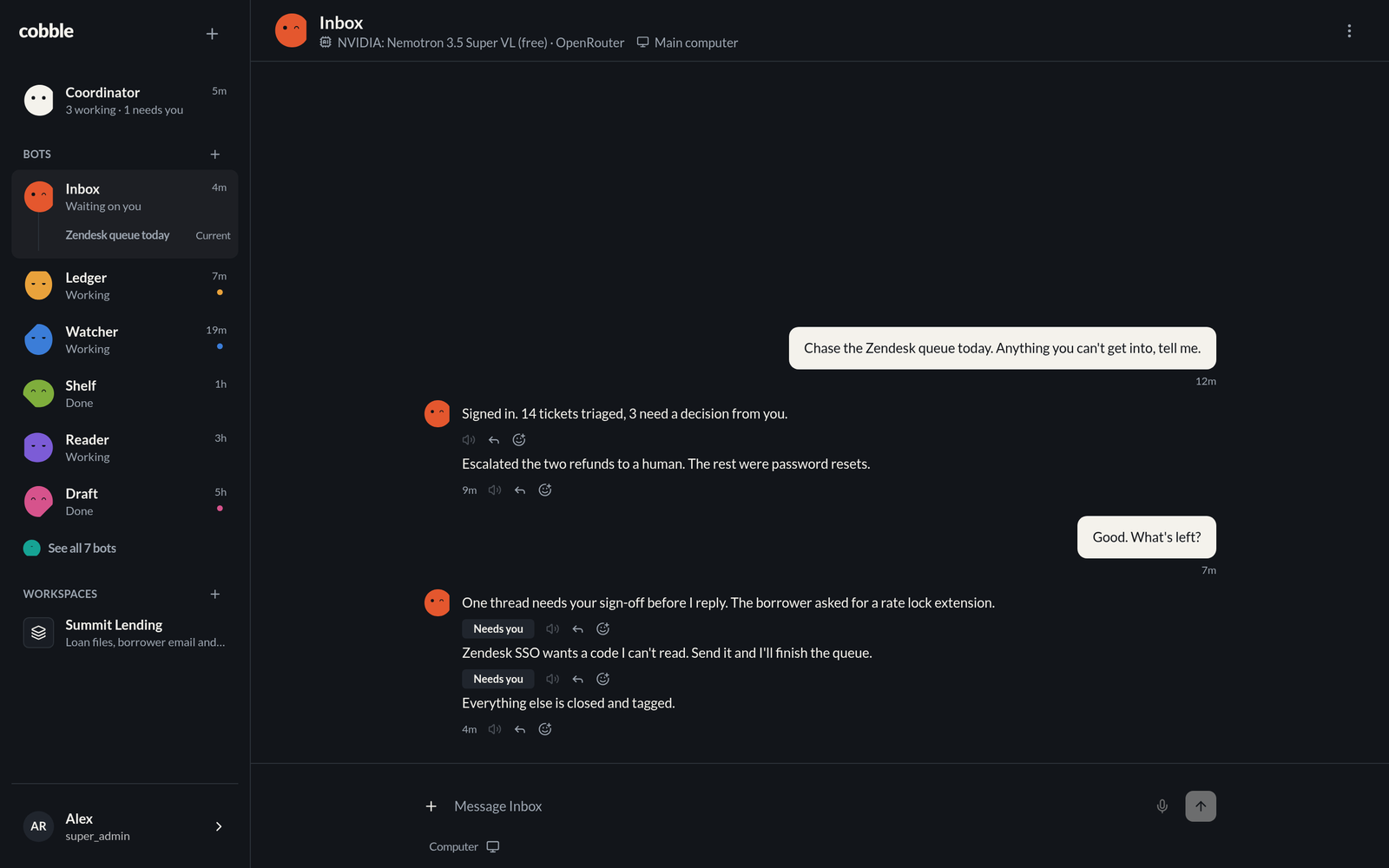
A crew of small AI worker bots you host yourself (alpha). ![Cobble: a crew of small AI worker bots you host yourself](docs/readme/hero-light.png#gh-light-mode-only) ![Cobble: a crew of small AI worker bots you host yourself](docs/readme/hero-dark.png#gh-dark-mode-only) [![CI](https://github.com/Moduletrace/cobble/actions/workflows/ci.yml/badge.svg)](https://github.com/Moduletrace/cobble/actions/workflows/ci.yml) [![License: MIT](https://img.shields.io/badge/license-MIT-blue.svg)](LICENSE) [![Website](https://img.shields.io/badge/website-cobble.moduletrace.org-0e1116)](https://cobble.moduletrace.org) [![Bun](https://img.shields.io/badge/runs%20on-Bun-14151a?logo=bun&logoColor=white)](https://bun.sh) [Website](https://cobble.moduletrace.org) · [Install](#install) · [Features](#features) · [Development](#development) · [Architecture](AGENTS.md)
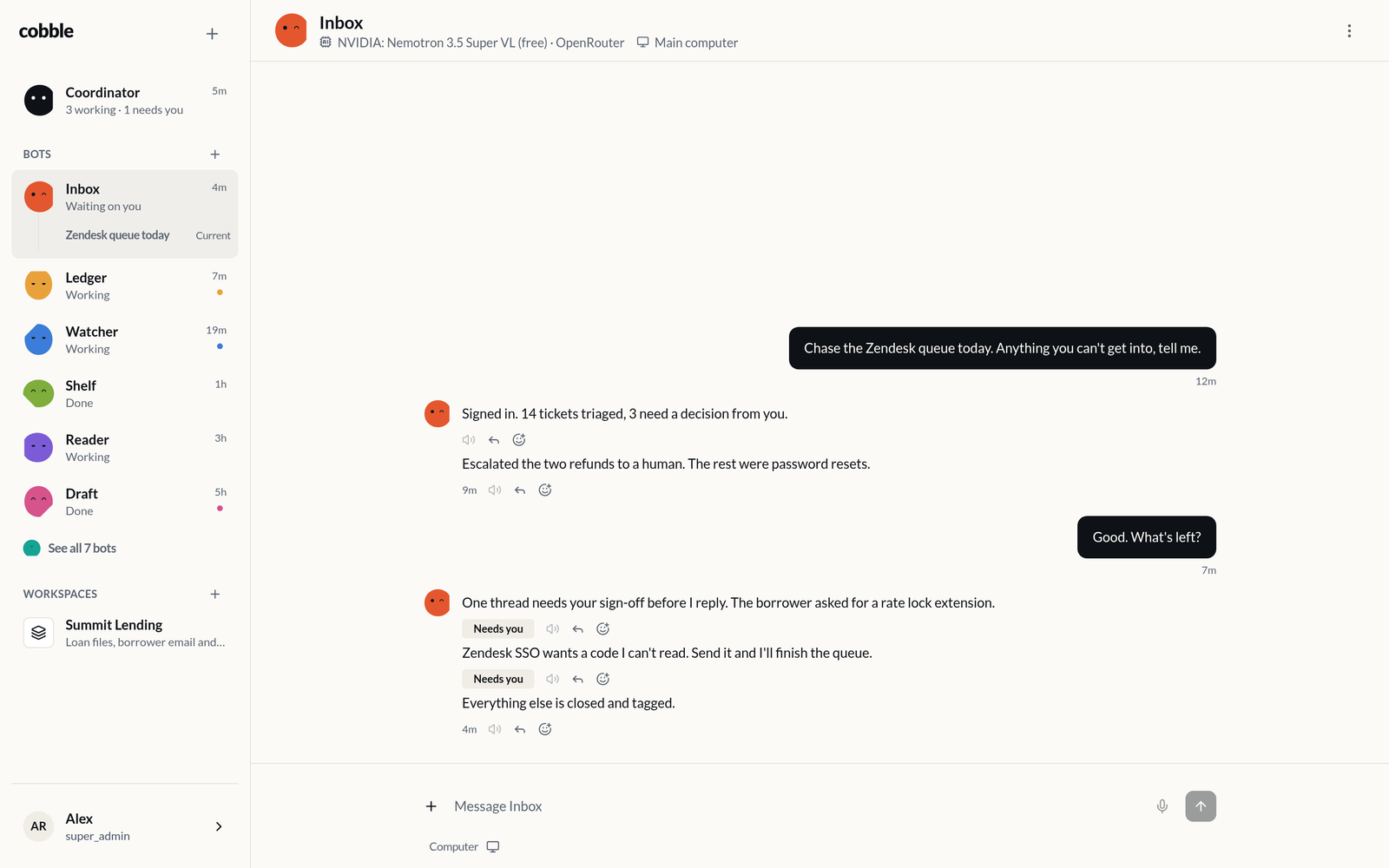
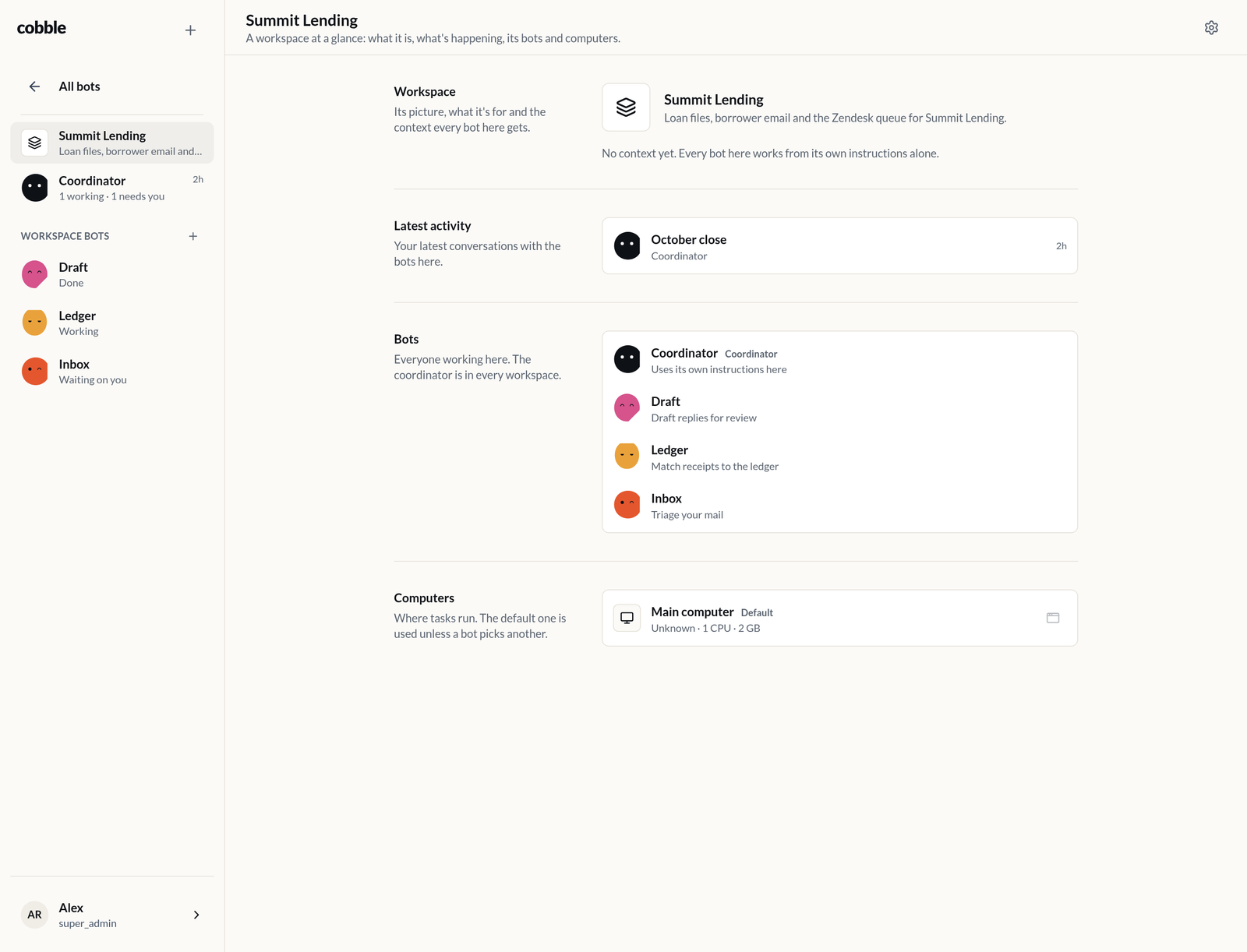
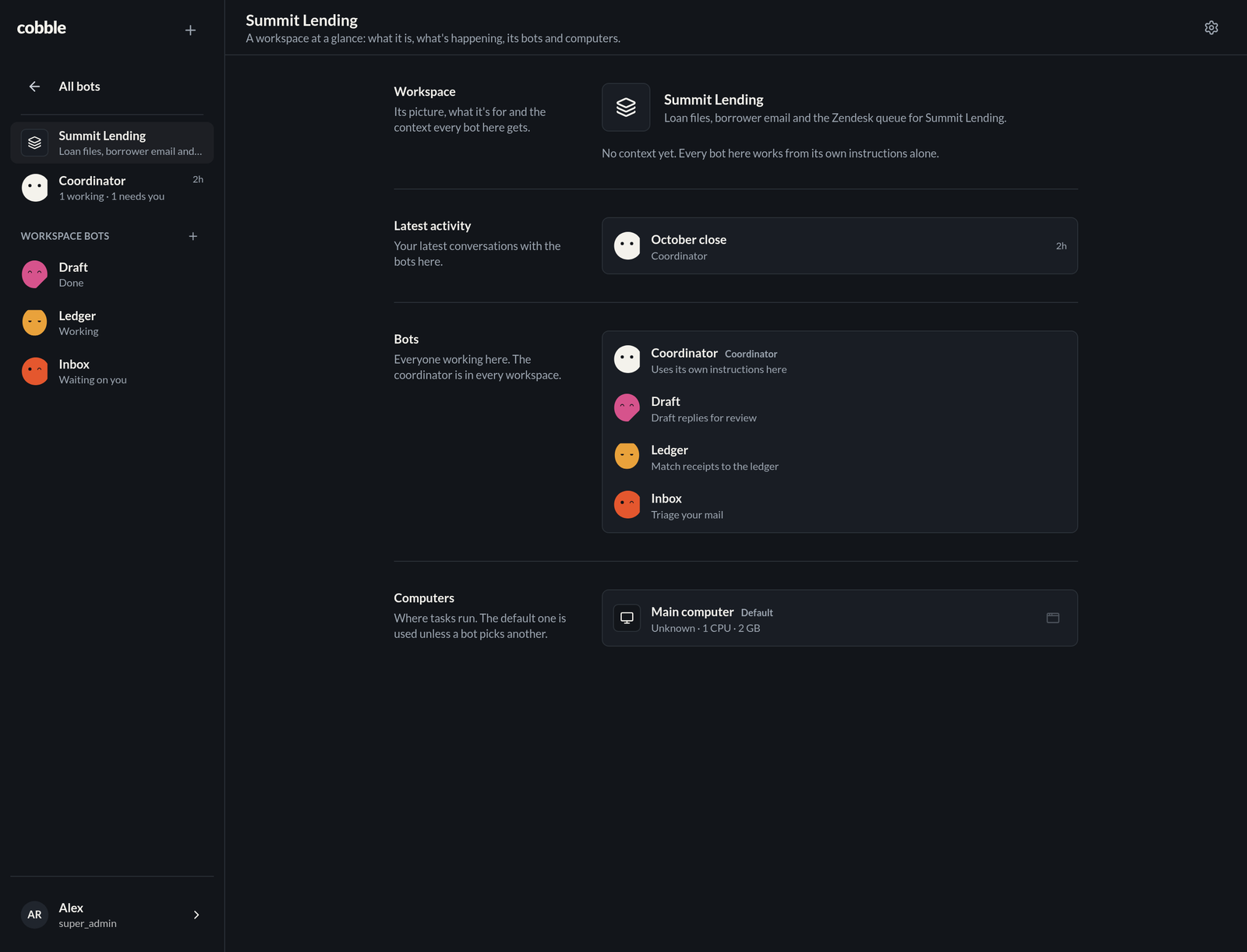
> **Alpha.** Cobble is still in alpha: interfaces, database schema and > settings change between releases, and things break. Install it to try it > out and to tell us what is wrong, but keep your own backups (Settings > > Backups) and do not put it in front of work you cannot lose. Every release > is a real release: the installer updates an existing install in place and > keeps its data. Cobble is a self-hosted crew of small AI worker bots. You get a coordinator and a set of workers, each with its own job, models, memory and workspace. They talk to you in one chat, share workspaces, run routines on a schedule, and drive their own computers: Docker sandboxes with a browser, a terminal, a code editor and a desktop that a bot can use and hand back to you when it needs help. It is an install, not a SaaS. One SQLite database, one Docker container, and your data on your own machine. **Why small workers instead of one big assistant** - **A crew, not a chat.** Each worker has one job and only loads the context for it. A five-bot crew does five things in parallel, and each one stays cheap and focused. - **Bots you can see through.** The face on each stone is the status: idle, working, done, asleep, needs you. You read the whole crew at a glance instead of asking each one what it is doing. - **Real computers.** Workers run on your own sandboxed machines, with browser, terminal, files and desktop, not just a tool loop. - **Yours.** Self-hosted, MIT, one SQLite file to back up, no account and no per-seat billing. ## Features | Area | What you get | | ---------- | ---------------------------------------------------------------------------------------------------------------------------------------------------------- | | Crew | One coordinator and as many workers as you need, each with a name, a role, a hue and its own core instructions | | Rail | The coordinator, your recent workers and their latest sessions, then your workspaces, each row carrying its status line | | Chat | Markdown with @-mentions for bots and #-mentions for workspaces, replies and quotes, reactions, attachments, older messages on scroll, drafts kept locally | | Stop | Stop a bot from the thinking row or the header menu: its queued and running work stops at once, everywhere you chat with it, and it goes idle | | Header | The bot's model, provider and computer at a glance, one click from either, and its picture, instructions and settings on the avatar | | Workspaces | A shared home for a group of bots: shared context, per-workspace instructions and memory, a default computer, and a dashboard | | Memory | Each bot keeps core memory, memory about you, and workspace memory, and rewrites it as it works | | Routines | Cron schedules per bot, written in chat, that queue a task on its own | | Computers | Docker sandboxes with browser, terminal, code editor and desktop, opened from the chat and handed back to you mid-task | | Files | Bots keep files on your data volume, search them by meaning, and attach the ones they make to a reply | | Models | OpenRouter, OpenAI, Anthropic, Gemini, DeepSeek, Groq, Mistral, xAI, Ollama or any OpenAI-compatible server, per bot and per harness | | Voice | Dictate into the composer, play any bot reply, with speech-to-text and text-to-speech models of your choice | | Tools | Install your own MCP servers and custom HTTP, script or prompt tools, and give them to bots or workspaces | | Skills | Write runbooks your bots follow. Each bot sees what a skill is for and reads the whole thing only when it needs it | | App | Installable PWA with Web Push, dark mode, and a rail built for a phone | ## Screenshots A workspace dashboard: what it is, its latest activity, the bots in it with their instructions there, and its computers. ![A workspace dashboard in Cobble](docs/readme/workspace-light.png#gh-light-mode-only) ![A workspace dashboard in Cobble, dark mode](docs/readme/workspace-dark.png#gh-dark-mode-only) ## Install On a Linux machine with Docker (the installer adds Docker when it is missing): ```bash curl -fsSL https://url.moduletrace.com/cobble | sudo bash ``` The app serves plain HTTP on the port it prints, usually `http://:7227`. Put a reverse proxy or tunnel in front of it for HTTPS (see [HTTPS](#https)), then open the proxy's address and create the super admin account. The first signup also creates the coordinator and the main computer, which pulls the sandbox image in the background. Give it a few minutes. Then open **Settings > Models**, add an OpenRouter key (or another provider) and wait for the model list to sync. This is what the bots think with. ### Requirements - Linux amd64 or arm64, with Docker. The installer installs Docker from get.docker.com when it is missing. - 2 CPU cores, 4 GB RAM and 20 GB free disk for the app plus one computer. Each computer is its own container with its own memory limit. - Docker Desktop on macOS works for development and small installs, but Linux is the supported host. - Port 7227, or another port with `--port`. - A reverse proxy or tunnel in front for HTTPS. The app itself serves plain HTTP and never handles certificates. The installer binds to `0.0.0.0` so the app is reachable from your phone on the same network. Use `--bind 127.0.0.1` when a reverse proxy is the only thing that should reach it. The app container itself is limited to 1 CPU and 2 GB of memory, since the heavy work happens in the computers' own containers. Change that with `--cpus` and `--memory`; each computer keeps its own limits. ## HTTPS Cobble serves plain HTTP. Terminate TLS in front of it with a reverse proxy (Caddy, nginx, Traefik) or a tunnel (Cloudflare Tunnel, Tailscale Serve), and point that at `http://:7227`: - Let the proxy set `X-Forwarded-Proto: https`. Cobble reads it to mark the sign-in cookies `Secure`; Caddy does this by default, and nginx needs `proxy_set_header X-Forwarded-Proto $scheme;`. - Pass `/ws` through as well as ordinary requests, including the upgrade. - Give the proxy a real certificate. Browsers treat plain HTTP as unsafe, so the installable app, offline support, Web Push notifications and voice recording stay off until the address is HTTPS. Nothing on the machine needs a certificate installed: the browser only ever talks to the proxy. See the Help page in the app for the common proxy fixes. ## Update and uninstall The same script is the updater. It keeps the database, media, computers' home directories and generated secrets, backs up the database before replacing the container, and does nothing when the image has not changed. ```bash curl -fsSL https://url.moduletrace.com/cobble | sudo bash ``` ```bash # Stop the app and keep the data curl -fsSL https://url.moduletrace.com/cobble | sudo bash -s -- --uninstall # Stop the app and delete the data curl -fsSL https://url.moduletrace.com/cobble | sudo bash -s -- --uninstall --purge ``` ### Options | Option | Meaning | | --------------------- | ---------------------------------------------------------- | | `--home DIR` | Install directory, default `/opt/cobble` | | `--data-dir DIR` | Data directory mounted at `/data`, default `HOME/data` | | `--port PORT` | Host port, default `7227` | | `--bind ADDRESS` | Host address to publish on, default `0.0.0.0` | | `--cpus N` | CPU cores for the app container, default `1` | | `--memory MB` | Memory for the app container in MB, default `2048` | | `--image IMAGE` | Container image, default `ghcr.io/moduletrace/cobble` | | `--version TAG` | Image tag, default `latest` | | `--extra-network NET` | Join another Docker network, for a tunnel or reverse proxy | | `--force` | Recreate the container even when it is current | | `--no-pull` | Use an image that is already on the machine | | `--skip-backup` | Update without a database backup | | `--no-docker-install` | Fail instead of installing Docker | | `--yes`, `-y` | Accept the defaults without asking | | `--uninstall` | Stop and remove the app container | | `--purge` | With `--uninstall`, also delete the data directory | ## How it fits together ``` You ── chat ── Coordinator ── delegates ── Workers │ │ ├── Workspaces ────────────┤ │ context, memory, bots │ ├── Routines ──────────────┤ │ cron schedules │ └── Computers ─────────────┘ docker sandboxes: browser, terminal, code, desktop ``` - **Coordinator** is yours alone. It plans, delegates to workers, and keeps the crew in order. It is the only bot that reaches every worker. - **Workers** are the crew. Each has a job, its own instructions and memory, and its own models if you want to tune cost per bot. - **Workspaces** group bots around a subject. Models, instructions, memory and the default computer resolve per workspace before per bot. - **Routines** are cron schedules that queue a task without you asking. - **Computers** are per-install Docker containers. Bots use them through the sandbox's tools, and you can open the same machine in the browser and take over. Each conversation is split into sessions, so a long-running bot does not grow one endless thread: the bot names a session, summarizes it, and carries the summary into the next one. ## Data and settings Everything that must survive an update lives under the install directory: ``` /opt/cobble/ .env # generated once, mode 600 install.conf # installer state backups/ # pre-update database snapshots backups-archives/ # whole-data archives, from Settings > Backups data/ db/cobble db/.backups/ media/ computers// # each computer's home directory bots// # each bot's files workspaces// # files shared in a workspace ``` `.env` holds the port and the encryption keys. The keys encrypt sessions and settings, so keep a copy and do not rotate them without re-entering provider keys and other secrets. Provider keys, MCP servers, tools and app settings are managed in the app, not in `.env`. Edit `.env` and run `docker restart cobble` to apply changes. The installer only appends missing values and keeps what is already there, apart from the port it manages. Settings > Backups makes two kinds of copy. Database snapshots (bun-sqlite's `backup` command) stay in `data/db/.backups` and can be restored from the app. Whole-data archives are a `tar.gz` of the entire `data/` directory, written to `backups-archives/` (mounted at `/backups-archives`, the `BACKUP_ARCHIVE_DIR` setting); every entry sits under one folder named after the archive, so extracting one by hand drops a single folder. Each group can create a copy, restore from one (a listed row, or a file uploaded from the button beside Create), download it and delete it; the newest five archives are kept. The app container is started with the Docker socket mounted and `MAIN_SERVER=1`, so it can create computer containers and run cron, the queue and Web Push. ## Images Every release publishes a multi-arch image to `ghcr.io/moduletrace/cobble`, which is what the installer pulls. Tags are `latest`, the release version, `major.minor` and the commit sha. The same image is copied into `git.tben.me/moduletrace/cobble` by `bun run mirror:gitea`, which runs after the build over the VPN (the Gitea registry is not on the public internet, so GitHub Actions cannot reach it). Install from Gitea with `--image git.tben.me/moduletrace/cobble`, or build from source with `docker build -t cobble:local .` and `--image cobble --version local --no-pull`. A release is published from a clean `main` with the two scripts, which tag the `package.json` version, push and create the release objects: ```bash scripts/publish-github.sh # or: bun run publish:github scripts/publish-gitea.sh # or: bun run publish:gitea ``` Both take `--version VERSION`, `--dry-run` and `--yes`. Only the GitHub release builds the image, and the Gitea registry is filled in afterwards, once that build has finished and from the VPN, by `bun run mirror:gitea`; see [RELEASING.md](RELEASING.md) for the full checklist. ## Development ```bash cp .env.example .env # set ENCRYPTION_KEY and ENCRYPTION_SALT (openssl rand -hex 32) bun install bun run db:schema bun run dev ``` Open `http://localhost:7227`. With no users, every page goes to `/auth/signup` to create the super admin. For a headless setup: ```bash SEED_SUPER_ADMIN_PASSWORD=... bun run seed ``` The development server serves plain HTTP, the same as the container. To try the app from a phone, run a proxy or tunnel in front of it (see [HTTPS](#https)); the installed app, Web Push and voice need that secure context. | Command | Purpose | | ---------------------- | ----------------------------------- | | `bun run dev` | Development server | | `bun run start` | Production server on the host | | `bun run typecheck` | Type-check | | `bun run test` | Run the test suite | | `bun run check:bundle` | Bundle budget after a build | | `bun run seed` | Create the super admin from the CLI | | `bun run seed:bots` | Add a sample crew | | `bun run db:schema` | Sync the schema and types | | `bun run gen:favicon` | Regenerate favicons and PWA assets | Plain Node does not work: the app runs on Bun. The stack is Bun, [`@moduletrace/bunext`](https://github.com/Moduletrace/bunext) for filesystem routing, SQLite via [`@moduletrace/bun-sqlite`](https://github.com/Moduletrace/bun-sqlite), Tailwind CSS and the `@moduletrace/twui` component library. The model layer is one adapter over OpenAI-compatible APIs, so any compatible provider works. See [AGENTS.md](AGENTS.md) for the full architecture, routes, queue, harness and data model. CI runs type-check and tests on every push and pull request; releases are built by GitHub Actions and pushed to both registries. See [RELEASING.md](RELEASING.md) for the release and launch checklist. ## Contributing Issues and pull requests are welcome, in English, on either [GitHub](https://github.com/Moduletrace/cobble) or [Gitea](https://git.tben.me/Moduletrace/cobble). Run `bun run typecheck` and `bun run test` before opening a pull request, and read [AGENTS.md](AGENTS.md) first: it documents the conventions the code follows. ## License MIT. See [LICENSE](LICENSE).